
DOM 操作
DOM(文档对象模型)操作是指通过 JavaScript 代码来操作网页的结构、内容和样式。DOM 操作使您能够在页面加载后动态地更新、修改和交互网页内容,以实现更丰富的用户体验。
增删改查
查找元素
可以使用下面各种方法来获取元素
| API | 描述 |
|---|---|
| document.querySelector() | 传入 css 选择器,返回第一个获取到的元素 |
| document.querySelectorAll() | 传入 css 选择器,返回元素列表(NodeList) |
| document.getElementById() | 传入元素 id,返回元素对象 |
| document.documentElement | 获取根元素 html |
| document.body | 获取 body 元素 |
| document.head | 获取 head 元素 |
| dom.children | 获取 dom 元素的子元素 |
| dom.parentElement | 获取 dom 的父元素 |
js
const div = document.querySelector('div') // 第一个 div 元素
const spans = document.querySelectorAll('span') // 所有 span 元素列表
const container = document.getElementById('container') // id 为 container 的元素
创建元素
使用 document.createElement('tagName') 增加一个元素,例如:
js
const p = document.createElement('p')
document.body.appendChild(p) // 将 p 元素插入到 body 末尾
修改元素
js
const div = document.querySelector('div')

div.innerText = '你好' // 修改文本
div.innerHTML = '<strong>你好</strong>' // 修改为html代码
删除元素
js
const parent = document.querySelector('.parent')
const child = document.querySelector('.child')

parent.removeChild(child) // 从父元素中删除子元素
parent.remove() // 直接将自身删除
元素属性
获取属性
元素的属性可以通过 element.propName 或 element.getAttribute('propName') 两种方法,例如:
html
<input value="初始值" />

<script>
  const input = document.querySelector('input')
  console.log(input.value) // "初始值"
  console.log(input.getAttribute('value')) // "初始值"
</script>
它们之间有一些重要的区别:
element.propName返回的是属性的当前值element.getAttribute('propName')无论何时都返回的是属性的初始值,即使属性已经通过 js 进行了修改。这是因为getAttribute仅仅返回 HTML 中指定的属性值,不会反映 DOM 属性的实际状态。
html
<input value="初始值" />

<script>
  const input = document.querySelector('input')
  console.log(input.value) // "初始值"
  console.log(input.getAttribute('value')) // "初始值"

  input.value = '新的值' // 修改 input 的 value 值

  console.log(input.value) // "新的值"
  console.log(input.getAttribute('value')) // "初始值"
</script>
自定义属性
为 HTML 元素添加额外的自定义属性,这些信息通常不会影响元素的默认行为,但可以在 JavaScript 中使用。自定义属性使用data-前缀,后面跟上自定义的属性名。
html
<div data-id="123" data-color="blue" class="foo">自定义元素</div>使用 js 访问自定义属性:
js
const foo = document.querySelector('.foo')

const id = foo.dataset.id // 获取自定义的 id 属性
foo.dataset.color = 'red' // 修改自定义的 color 属性
元素样式
style 样式
元素的样式可以通过 element.style 或 getComputedStyle(element) 两种方法获取,它们的区别如下:
element.style:获取元素的内联样式(style 属性),得到样式对象,对象中的所有样式属性均可以被赋值,赋值后会应用到元素的内联样式中getComputedStyle(element):获取元素的计算样式,得到一个样式对象,该样式对象中的属性是只读的,无法被重新赋值
js
const div = document.querySelector('div')

div.style.width = 200px

const computedStyle = getComputedStyle(div)
cnosole.log(computedStyle.width)
class 类名
使用元素的 classList 属性操作元素的类名,这个属性是一个包含元素的所有类名的 DOMTokenList 对象
常见方法:
add(class1, class2, ...):向元素添加一个或多个类名remove(class1, class2, ...):从元素中移除一个或多个类名toggle(class, force):如果元素中包含指定的类名,则移除它;如果不包含,则添加它。如果force参数为true,则强制添加类名;如果为false,则强制移除类名。contains(class):检查元素是否包含指定的类名,返回布尔值。item(index):返回在指定索引位置的类名。replace(oldClass, newClass):用新类名替换元素中的指定旧类名。
js
const dom = document.querySelector('div')

dom.add('container', 'current')
dom.remove('current')
dom.toggle('current')
dom.contains('current')
dom.replace('container', 'wrapper')
尺寸和位置
元素相对于视口的位置
element.getBoundingClientRect() 是一个常用的 DOM 方法,用于获取一个元素相对于视口(viewport)的位置和尺寸信息,返回一个 DOMRect 对象,该对象包含以下属性:
x:元素左侧距离视口左侧的像素单位y:元素顶部距离视口顶部的像素单位top:同yleft:同xright:元素右侧距离视口右侧的像素单位bottom:元素底部距离视口底部的像素单位width:元素宽度height:元素高度
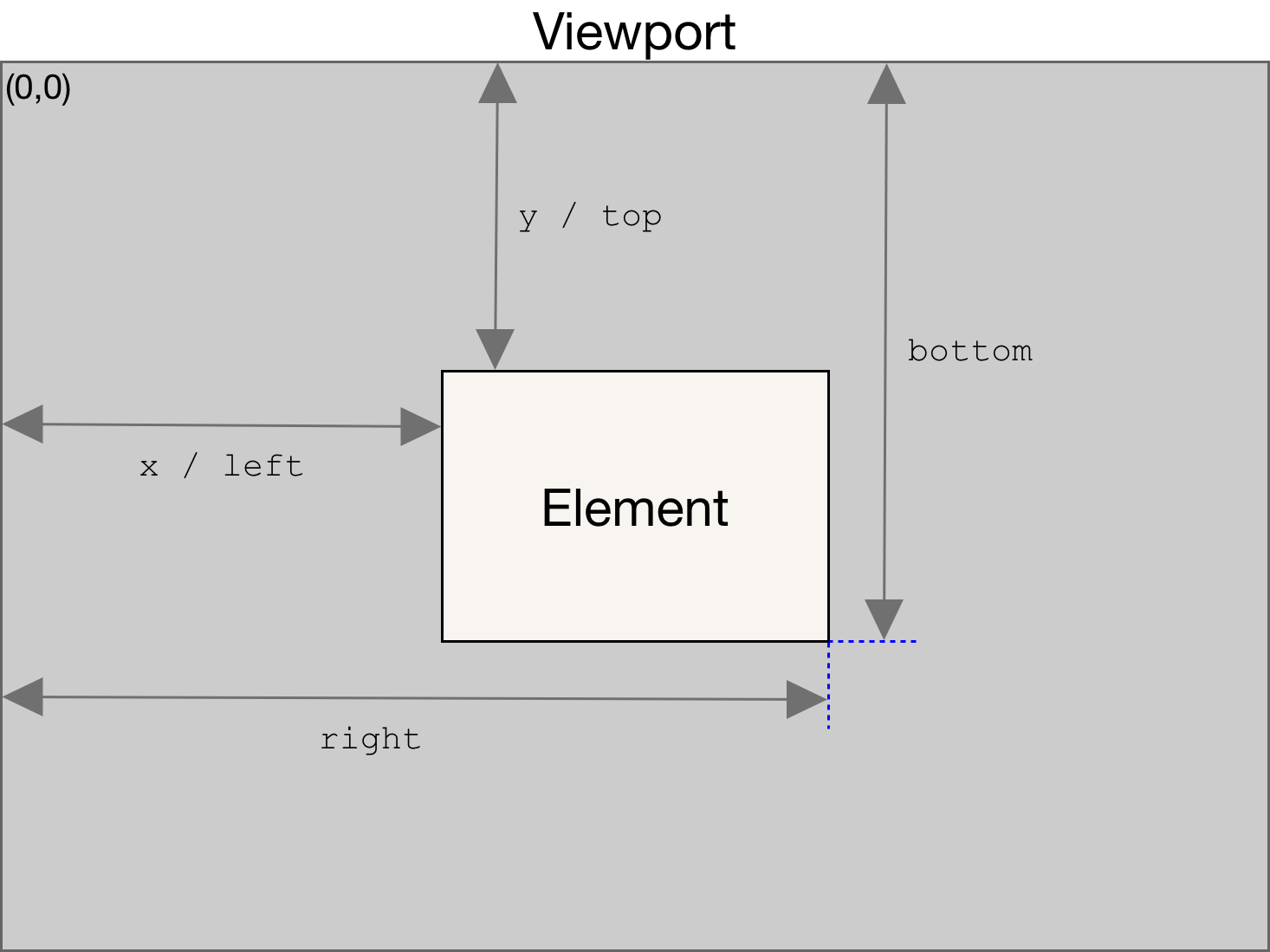
html
<div style="width:100px;height:100px"></div>

<script>
  const div = document.querySelector('div')
  const rect = div.getBoundingClientRect()

  console.log('right:', rect.right) // 元素右侧距离视口右侧的像素单位
</script>
元素尺寸
获取元素的尺寸信息有三种方法
offsetWidth和offsetHeight:返回元素的整体宽度和高度,包括边框、内边距和滚动条(如果存在)clientWidth和clientHeight:返回元素的内容框(即不包括边框和滚动条)的宽度和高度element.getBoundingClientRect():返回一个包含位置和尺寸信息的DOMRect对象,可以从中提取宽度和高度。
js
const div = document.querySelector('div')

const w1 = div.offsetWidth
const h1 = div.offsetHeight

const w2 = div.clientWidth
const h2 = div.clientHeight

const rect = div.getBoundingClientRect()
const w3 = rect.width
const h3 = rect.height
这些方法可以根据你的需求来选择:
- 需要考虑元素的整体尺寸(包括边框和滚动条),则使用
offsetWidth和offsetHeight - 只关心元素的内容尺寸,不包括边框和滚动条,那么使用
clientWidth和clientHeight - 需要更详细的位置和尺寸信息,包括元素的位置信息,可以使用
getBoundingClientRect()
视口尺寸
要获取视口的尺寸,可以使用以下方法:
document.documentElement.clientWidth和document.documentElement.clientHeight:获取浏览器可视区域的宽度和高度(不包括滚动条)window.innerWidth和window.innerHeight:获取浏览器可视区域的宽度和高度(包括滚动条),不包括浏览器窗口的边框、工具栏、菜单栏等浏览器 UI 元素window.outerWidth和window.outerHeight:获取浏览器窗口整体的外部宽度,包括浏览器窗口的边框和工具栏、菜单栏等浏览器 UI 元素window.screen.width和window.screen.height:获取用户屏幕的宽度和高度。这个属性对于识别用户屏幕大小,以便进行响应式设计或进行特定布局计算非常有用。
js
console.log(document.documentElement.clientWidth)
console.log(window.innerWidth)
console.log(window.screen.width)